
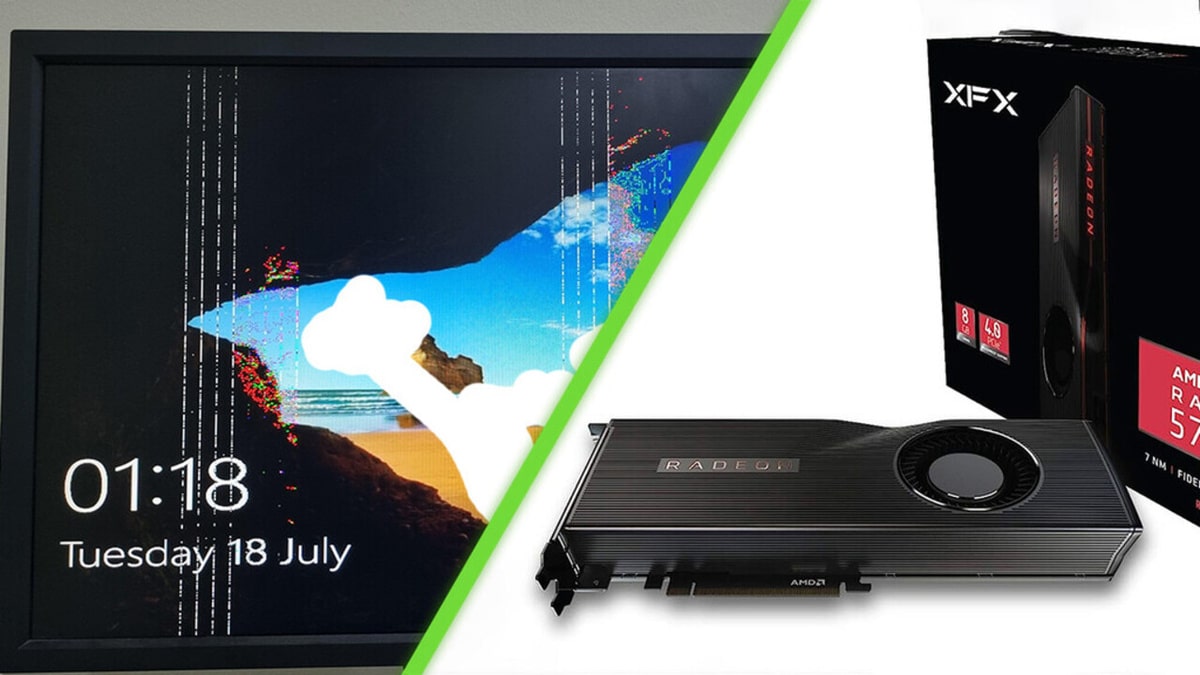
A simple stress test gone wrong teaches us valuable lessons in PC gaming safety and hardware care.
Amazon co-founder MacKenzie Scott has donated over $19 billion to charity in just five years
Diamond batteries powered by nuclear waste promise 28,000 years of clean energy
Swapping a Graphics Card: A High-Stakes Upgrade
For any dedicated gamer, upgrading their PC is a thrilling experience. The promise of better performance, smoother gameplay, and the satisfaction of having the latest tech running under the hood is hard to beat. However, as one gamer learned the hard way, it’s not always as easy as it seems, especially when dealing with one of the most important components: the graphics card.
Unlike a plug-and-play console, upgrading a GPU requires ensuring that the entire system—power supply, cooling system, and motherboard—are up to the task. This makes installing a new graphics card an inherently high-stakes move. If one part of the system isn’t compatible or well-maintained, the consequences can be catastrophic.
This reality hit a Reddit user, who goes by the handle An_average_muslim. Eager to push his new AMD Radeon RX 5700 XT to its limits, he set it up for a standard stress test—a routine benchmark to evaluate the GPU’s thermal performance and stability. It’s a fairly standard procedure for any PC enthusiast, but unfortunately, things didn’t go as planned.
A Stress Test That Turned Into a Disaster
After starting the stress test, the gamer decided to step away from his setup, assuming everything would go smoothly while the PC did its work. However, 30 minutes later, he came back to find something far worse than a completed benchmark. His monitor, the very tool he used to check the test results, was ruined—seemingly scorched from the process.
In a panic, he posted a photo of the damage to the r/pcmasterrace subreddit, a community known for its knowledgeable users in the realm of PC gaming and hardware. The responses were swift and varied, with some offering harsh criticism, and others diving into technical theories.
The Internet Reacts: From Blame to Diagnosis
The feedback online was a mixture of blunt advice and helpful insight. Some users took a stern approach, saying it was reckless to leave such a high-stakes test running unsupervised. And they weren’t wrong—when you’re pushing your system to its limits, especially with an upgrade like a new GPU, supervision is key to avoiding disasters like this.
Others took a more technical angle. Many suspected a faulty GPU that might have caused electrical feedback or overheating, which could have affected the monitor through the video signal. The most helpful comments, however, came from seasoned builders who pointed to thermal runaway as the likely culprit. They explained that if the thermal pads on the graphics card weren’t functioning properly, it could cause an overheating situation that affects not just the GPU but other connected components, such as the monitor.
NASA warns China could slow Earth’s rotation with one simple move
This dog endured 27 hours of labor and gave birth to a record-breaking number of puppies
The overheating could have been so severe that the heat transfer from the GPU caused the damage, either directly through the video signal or from a power surge, resulting in a fried screen.
Two Lessons Every PC Builder Should Take to Heart
This unfortunate situation offers two essential lessons for any gamer or PC builder:
-
Never leave a stress test unattended. It might seem like a small risk, but when you’re pushing your hardware to the limit, things can go south quickly. Whether it’s a potential overheating issue or a sudden hardware failure, staying nearby ensures that you can act fast if something goes wrong.
-
Monitor your GPU thermals. If you’re dealing with a powerful card or an aftermarket cooling setup, it’s crucial to keep an eye on its temperature. Small upgrades like replacing cheap thermal pads with high-quality ones can make a huge difference in maintaining proper heat dissipation and preventing catastrophic damage.
For An_average_muslim, his story has become an accidental lesson for the PC community. And for the rest of us? Well, we’re checking our fans, reapplying our thermal paste, and being more cautious before running any heavy benchmarks in the future. After all, in the world of PC gaming, knowledge, and caution can save both your gear and your nerves.