

Buried behind your walls or snaking along baseboards, those coaxial cables that once delivered TV channels might be more valuable today than ever. With streaming services replacing traditional cable, most of us have long forgotten about those old wires — but a quiet revolution is turning them into the foundation for fast, stable home networks, without the mess of new installations.
Amazon co-founder MacKenzie Scott has donated over $19 billion to charity in just five years
Diamond batteries powered by nuclear waste promise 28,000 years of clean energy
Tired of Wi-Fi Dead Zones?
Wi-Fi is convenient — until it isn’t. If you’ve ever tried working from a room where the signal barely makes it, or gaming in a laggy corner of the house, you know the frustration. I once set up my home office in a spare bedroom, only to discover my Zoom calls turned robotic every time someone used the microwave. It was either relocate or get creative.
Running Ethernet cables was out of the question. Like many homes, ours wasn’t pre-wired for it, and drilling holes through drywall wasn’t on my DIY wish list. That’s when I stumbled upon a solution hiding in plain sight: those unused coaxial TV cables already built into our walls.
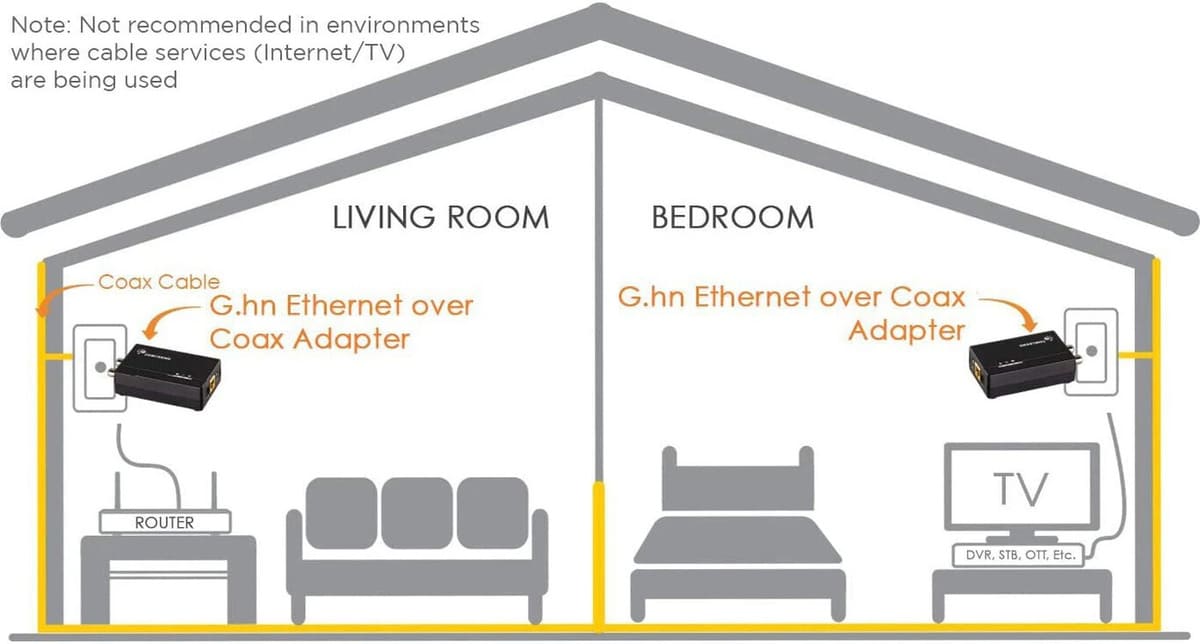
How to Turn TV Cables Into Ethernet Lines?
Coaxial cables, the same ones used for cable TV and satellite signals, can actually carry high-speed internet using special coax-to-Ethernet adapters. These compact devices act like translators, converting data signals so your internet can travel along the existing coax network in your home.
The best part? No need to rip out walls or hire an electrician. Just plug an adapter into a coaxial outlet near your router, and another near your device — whether that’s a smart TV, gaming console, or a desktop in your home office. You’ll get a reliable wired connection that can outperform spotty Wi-Fi in many cases.
What You’ll Need (And What to Watch Out For)
Before you dive into this clever networking trick, it’s worth checking a few things to ensure it’ll work for you:
-
Cable condition matters: If your coaxial cables are ancient or frayed, they may not deliver optimal speeds. A quick inspection — or testing with a basic coax cable tester — is a smart first step.
-
Splitters can complicate things: If your home setup includes splitters or amplifiers to send TV signals to multiple rooms, they might interfere with the internet signal. You may need to reconfigure or replace them with MoCA-compatible splitters.
-
Choose the right adapter: Coaxial adapters come in different models and speed ratings. Pick one that matches your internet plan and usage — especially if you’re streaming 4K, gaming online, or hosting video calls all day.
Popular Adapters Worth Considering
Several devices on the market can help you bring your coax cables back to life. Here are a few reliable options:
NASA warns China could slow Earth’s rotation with one simple move
This dog endured 27 hours of labor and gave birth to a record-breaking number of puppies
-
Comtrend GCA-6000: A user-friendly kit that includes two adapters, supporting speeds up to 1.2 Gbps. It also preserves TV signal pass-through, so you don’t lose cable functionality.
-
ScreenBeam MoCA 2.5: With sync speeds up to 2.5 Gbps, this adapter is great for high-demand households. Just note that its Ethernet port maxes out at 1 Gbps, which is still plenty for most users.
-
GoCoax MoCA 2.5: A favorite among tech enthusiasts, this model delivers full 2.5 Gbps Ethernet throughput — ideal for gamers or heavy streamers. It’s sold individually, so make sure to grab two.
-
LINOVISION PoE over Coax: A solid option for upgrading security camera systems, this one also supports Power over Ethernet (PoE), transmitting both power and data via a single cable — no extra wiring required.
A Smart Upgrade Without the Cost
Transforming your old TV wiring into a wired internet network isn’t just tech-savvy — it’s practical. Instead of paying for professional wiring or putting up with slow Wi-Fi, you can reuse what’s already in place. And the performance boost can be dramatic.
Imagine a lag-free Zoom call in the attic, or flawless streaming in that room farthest from the router. With this approach, your internet can reach every corner of your home — quietly, affordably, and efficiently.
When It Works (and When It Doesn’t)
Of course, this solution isn’t universal. If your home was never wired for coax, or if your cables are damaged beyond repair, this won’t help. But for many homes — especially those built in the cable-TV heyday — it’s a hidden upgrade waiting to happen.
So before you write off those old TV jacks as outdated relics, think again. They could be the backbone of a faster, smarter home network.