
Amazon co-founder MacKenzie Scott has donated over $19 billion to charity in just five years
Diamond batteries powered by nuclear waste promise 28,000 years of clean energy
Crazy in a Good Way
A zealous enthusiast has uploaded an article that compares System Settings across different Mac system versions. It’s clear that there has been significant evolution, and the latest version, developed using SwiftUI, leaves much to be desired.
But this enthusiast didn’t just stop at posting comparison images; he went all out and embedded emulators on his webpage so you can test things out yourself! So, not only can you compare system settings, but you can also experience using Macs as they were used back in the day. It’s a throwback to the 80s when we were prepping kids for a nuclear holocaust with games like Missile Command…
You can use the emulators, but this author went even further: he integrated them within an image of a period computer and even considered the screen angle. This page is a collaboration that includes the work, with the agreement and participation, of Mihai Parparita who created Infinite Mac. You can emulate not only most old Mac systems (up to Tiger, my favorite) but also NeXT systems! In total, 69 systems are emulated, including 15 NeXT systems.
We talked about this a few years ago. It’s worth noting that solutions to emulate systems in your browser have existed for many years. It never ceases to amaze me; I still remember the first time I saw a video on a computer and thought it was magical. Imagine, text emulating an entire system in a browser…
Control Panel Evolution
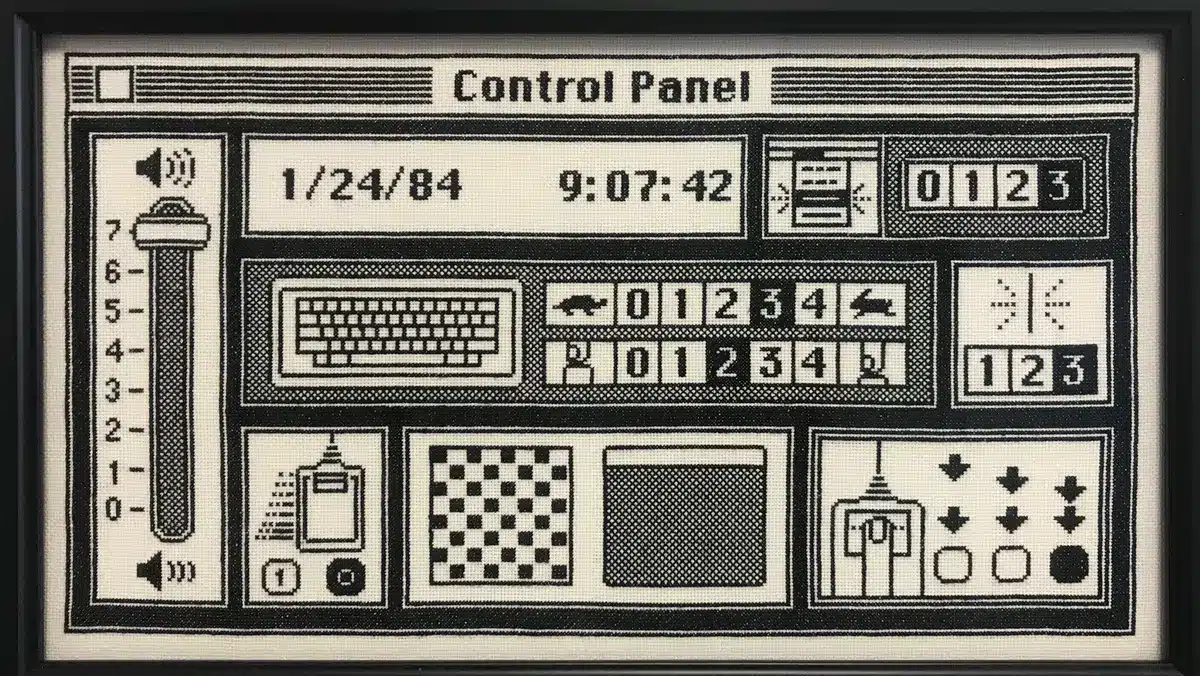
It’s evident that the Control Panel, or “Tableau de bord” in French, has changed dramatically since 1984. It initially served an educational purpose since no one knew how to use a mouse. Moreover, there were numerous settings related to keyboard management and keystroke repetition. Back then, systems did not all handle keystrokes in the same manner. Since computers were primarily used for typing documents (or commands), the feel and response of keyboards were crucial for many users, necessitating options to tailor the keyboard settings as closely as possible to user preferences.
For the very first Mac, the Control Panel was quite cartoonish, thanks to the talents of Susan Kare. For instance, increasing the keyboard repeat rate was represented by a rabbit, and slowing it down by a turtle. This playful aspect gradually disappeared in later versions, likely due to the departures of Susan Kare and Steve Jobs.
System 6 introduced a sidebar that organized the different settings. In the article, this is showcased with the venerable Macintosh Portable. Every time the first portable Mac (or transportable…) is mentioned, I can’t help but show the video of Jean-Louis Gassée assembling it completely during its presentation. Impressive.
With System 7, color makes its debut. Even though previous systems managed color, it was a bit odd. The operating system itself was in black and white, while applications could display colors. With System 7, everything is colorful, starting with the Control Panels and its array of vibrant icons.
NASA warns China could slow Earth’s rotation with one simple move
This dog endured 27 hours of labor and gave birth to a record-breaking number of puppies
With Mac OS 8, Apple was in crisis and tried to respond to Windows 95 with a gray theme called Platinum
, which strongly resembled the look of its competitor from Redmond. When Steve Jobs returned to Apple and introduced the iMac a year later, he attempted to evolve the system. As the iMac was marketed as the computer for the Internet, there naturally was an Internet section in the Control Panel, where you could choose Netscape as your default browser over Internet Explorer.
Then, we move to Mac OS X, with its icons featuring reflections, transparencies, and the famous pinstrips
. It was a radical but welcome change, bringing the Mac into the 21st century. The end of the Control Panel/Control Panel
, it was renamed System Preferences
.
NeXT
As you may know, Mac OS X is a reimagination of the NeXT system. Here we are in 1992 with the famous NeXT Cube featuring a grayscale screen but with a far superior definition than its competitors.
We can see elements that Mac OS X would later adopt, such as a type of Dock on the side or a Workspace Manager, akin to the Finder, with its column view. Apps had a .app extension. Indeed, it’s the grandfather of the Mac!
Even the Lisa is present, though unfortunately, it isn’t interactive.
However, a short video lets you see the preferences on the Lisa system. They are generally the same preferences that would appear a year later on the Macintosh, such as keyboard typing speed or the delay between clicks. However, the interface is much more spartan and lacks the personality infused by Susan Kare.
I invite you to explore and experience this incredible page. Be aware, some systems are slower than others, like Panther on the stunning iMac G4. The creator went so far as to list tasks to be performed and there are even some easter eggs
. If you want to dive deeper, you can emulate almost all the Mac and NeXT systems on this page.
Excuse me while I spend my afternoon trying to beat Shufflepuck Café for the thousandth time.