
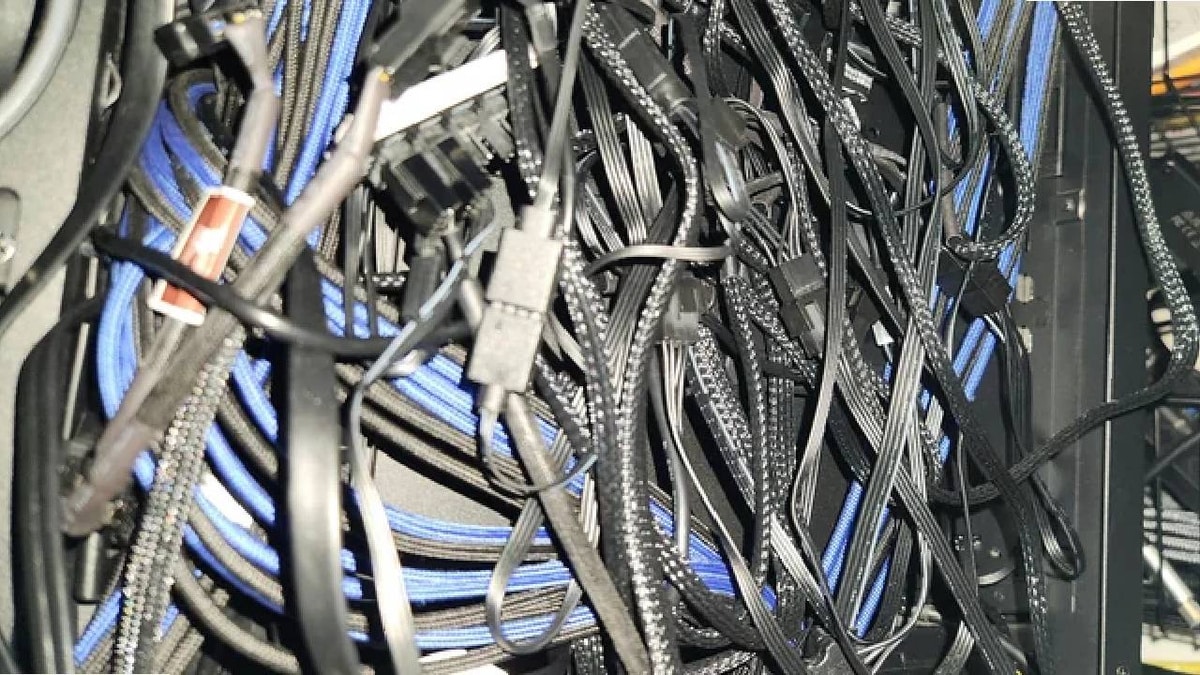
In the world of gaming PCs, there’s always someone pushing the boundaries of what’s possible. Some enthusiasts go all out, striving for the highest performance possible, while others focus on creating visually stunning setups. Recently, one Reddit user took it to the extreme by installing 22 fans into his gaming rig to test how efficient he could make the cooling system. While the experiment garnered attention for its ambitious nature, it also uncovered a major issue that many users overlook: cable management.
Amazon co-founder MacKenzie Scott has donated over $19 billion to charity in just five years
Diamond batteries powered by nuclear waste promise 28,000 years of clean energy
The 22-Fan Setup
The journey started with a simple question: What happens when you add an absurd amount of fans to a gaming PC? The Reddit user added 17 extra fans to a rig that already had 5 built-in fans, bringing the total to an astonishing 22 fans. The goal was straightforward—he wanted to see just how much these additional fans would lower the PC’s temperature. While the cooling system did become more efficient, the results weren’t exactly what he had anticipated. The performance was better, but the real issue lay elsewhere.
Despite all the technical planning, one important aspect was completely overlooked: cable management. As you can imagine, cramming 22 fans into a single gaming PC turned into a tangled mess of wires, and that’s where the problems began.
A Nightmare in Cable Management
The issue with adding so many fans wasn’t just the number itself—it was how the fans interacted with the other components and with each other. With extra cables coming from every direction, things quickly became tricky. The wires started to block airflow, creating areas where heat could accumulate, ultimately undermining the effectiveness of the entire cooling system. But it wasn’t just about functionality—visual chaos was another significant problem. The tangled mess of cables wasn’t just inconvenient; it looked like a rat’s nest inside the case.
Here’s a breakdown of how the user positioned the 17 additional fans:
- 3 fans at the front of the case
- 1 fan at the back
- 3 fans on the side
- 6 fans dedicated to water cooling
- 3 extra fans for the graphics card
- 1 fan for the RAM
Together with the 5 already integrated into various components, these fans were all connected by a web of cables that seemed to cover every inch of the case. While everything technically worked, the result was far from ideal. The cables were everywhere, and the rig looked more like a spaghetti junction than a well-organized gaming machine.
The Sound of a PC on the Edge
In his post, the user described the experience of running this fan-heavy setup. His PC sounded like it was about to explode, and not in the “cool, high-performance” way. It felt like a submarine on the verge of implosion. The metal of the case groaned, the fans whirred at full speed, and the entire system seemed to be pushing the limits of what the case could handle. The temperature may have been well-regulated, but the setup gave off the vibe of a time bomb ready to go off.
Despite the chaos, the user found a practical solution: he simply decided to close the case and not think about it too much. After all, if everything was working, why worry about cable management? His solution wasn’t perfect, but it kept his rig functional—at least until his next upgrade.
NASA warns China could slow Earth’s rotation with one simple move
This dog endured 27 hours of labor and gave birth to a record-breaking number of puppies
The Takeaway : Sometimes Less is More
This gaming enthusiast’s experiment serves as an interesting case study in the pursuit of maximum performance. Yes, the cooling system worked incredibly well with the extra fans, but the cable management issue was a major dealbreaker. The setup may have been impressive in theory, but in practice, it became a chaotic jumble of wires and constant noise.
As much as we love pushing the limits with our rigs, this experiment serves as a reminder that simplicity often leads to better results. Sometimes fewer fans, with better cable management, can make a big difference in both performance and user experience. So while it’s exciting to try something new and push the boundaries of PC cooling, the lesson here is clear: a clean, organized setup is often more reliable and long-lasting.